

The Linkwise Reader strips an article down to its text, then hands you the entire look of that text. Paper colour, ink weight, typeface, column width, line spacing, alignment , all of it is yours, and all of it applies instantly to every article you open.
This page covers everything in the Reader's styling panel.
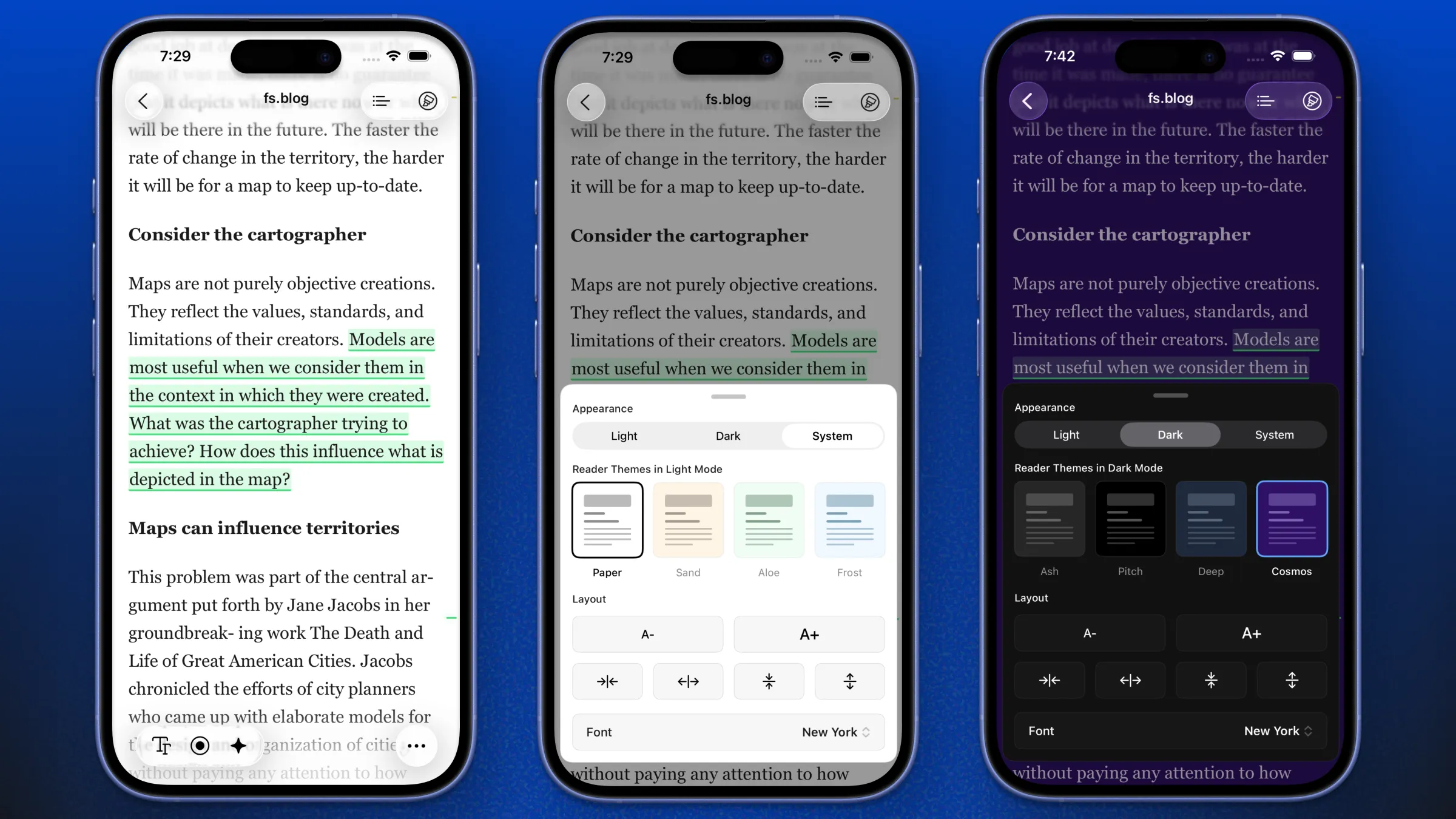
Opening the styling panel
Open any saved link in the Linkwise Reader, then tap the format icon ( TT ) in the Reader's bottom toolbar.
Device | How it appears |
|---|---|
iPhone | A bottom sheet you can drag down to dismiss |
iPad | A popover anchored to the |
Keyboard attached | ⌘⇧S opens and closes it |
Every change applies live - you'll see the article behind the panel restyle as you tap. There is no "Apply" or "Done" button; just dismiss the panel when you're happy.
The TT button only appears on articles that Reader mode can handle. On a page Linkwise can't parse into an article, and on PDFs (which render natively, with no reader layer), there is nothing to style, so the button is hidden.
The panel at a glance
The styling panel has four blocks, top to bottom:
Appearance - Light / Dark / System
Reading Experience - Standard / E-Ink
Themes (Standard) or Paper, Contrast, Ink (E-Ink)
Layout - text size, column width, line spacing, alignment plus the Font row
1. Appearance - Light, Dark, System
Option | What it does |
|---|---|
Light | The Reader always uses your light-side look, whatever the phone is doing |
Dark | The Reader always uses your dark-side look |
System | The Reader follows the app, which in turn follows your device (see below) |
How "System" resolves. Linkwise has its own app-wide appearance setting at Settings → Preferences → Appearance (System / Light / Dark). When the Reader is set to System it follows that; and when the app setting is also System, it follows your device's Light/Dark setting, including automatic sunset switching.
So: Reader = System → App = System → iOS = Dark gives you a dark Reader.
Your Light and Dark picks are stored separately. Choosing Cosmos while in Dark does not overwrite the Sand you chose in Light. Switch back and forth as often as you like - each side remembers its own theme, paper tint and everything else that is scheme-specific. This is also why the theme grid only ever shows four options: the four that belong to the side you're currently reading on. The section header tells you which - "Reader Themes in Dark Mode".
2. Reading Experience - Standard vs E-Ink
This is the switch the old page didn't mention, and it's the biggest one on the panel.
Standard | E-Ink | |
|---|---|---|
Palette | 8 colour themes | 3 paper tints, no colour at all |
Motion | Smooth scrolling, animated transitions | None |
Depth | Soft shadows, rounded corners, tinted fills | Flat, square, hard 1px rules |
Images | Full colour | Grayscale, contrast-boosted |
Highlights | 5 colours | 5 underline patterns |
Best for | Everyday reading on a bright screen | Long sessions, low light, tired eyes, e-reader habits |
Both are free. E-Ink is not a Pro feature and not a paid add-on.
3a. Standard themes
Eight themes, four per side. You can only select from the four that match your current Light/Dark state.
Light themes
Theme | Paper | Character |
|---|---|---|
Paper |
| Classic white. Maximum contrast, the default. |
Sand |
| Warm sepia with brown-grey ink. The easiest light theme on the eyes at night. |
Aloe |
| Soft green paper with deep forest ink. Calm, low glare. |
Frost |
| Cool pale blue with navy ink. Crisp and clinical. |
Dark themes
Theme | Paper | Character |
|---|---|---|
Ash |
| Soft charcoal, not black. The default dark theme, and the gentlest. |
Pitch |
| True black. On an OLED iPhone or iPad the pixels are genuinely off - best battery, deepest contrast. |
Deep |
| Dark navy slate. Reads warmer than pure grey. |
Cosmos |
| Deep violet with lilac ink. The most stylised of the eight. |
Each theme also sets its own secondary text, surface and accent colours, so pull-quotes, captions, code blocks, table rules and links all stay in key rather than being pasted onto a new background.
3b. E-Ink mode
E-Ink mode makes the Reader behave like an electrophoretic panel - a Kindle, Kobo or Boox screen. It is deliberately not a ninth theme, because it changes far more than colour.
Switch Reading Experience to E-Ink and the theme grid is replaced by three controls: Paper, Contrast and Ink.
What E-Ink actually changes
# | Change | Why |
|---|---|---|
1 | All colour is removed. Every accent, link colour, inline colour from the original site and syntax-highlight colour collapses to ink. | A real e-ink panel resolves ~16 shades of grey and no hue at all. |
2 | All motion stops. No animations, no transitions, no smooth scrolling. | A panel refresh takes 150–500 ms and smears; animation becomes ghosting. |
3 | All depth is removed. No shadows, no gradients, square corners on images, code blocks and embeds. | A matte, diffuse surface renders soft elevation as mud. |
4 | Tinted fills become hard rules. Blockquotes get a 3px ink bar; code blocks, tables and disclosure boxes get 1px borders. | A 1px line is legible where a 4% background wash isn't. |
5 | Images are flattened to ink. Grayscale, with contrast lifted ~18% first. | Photos lose midtone separation when hue is removed — the same pre-boost real e-ink dithering applies. |
6 | Type is set like a printed book. Glyph outlines are thickened rather than the face swapped. | Diffuse particle edges eat thin strokes. |
7 | Highlight colours become patterns. Yellow = solid underline, Green = dashed, Blue = dotted, Pink = double, Purple = wavy. | Five hues are indistinguishable in grayscale — this is the trick print uses for keyed chart series. |
8 | The read-aloud band inverts instead of glowing, and the active word underlines in paper. | An inverted block is the one "highlight" e-ink renders cleanly. |
The panel itself, the font picker, the outline rail and the toolbars all take the same paper, so nothing bright is left floating over a monochrome page.
Paper
The substrate. None of these go near pure white - real Carta white is a pigment lit by the room, not a light source.
Paper | Light-mode substrate | Character |
|---|---|---|
White |
| Neutral Carta white - the default look of a modern e-reader |
Warm |
| Amber, like a Kindle's warm frontlight turned up. Default. |
Gray |
| Low-glare grey. Least contrast, easiest in a bright room |
E-Ink respects Light/Dark too. Each paper has an inverted "night ink" variant, because real e-readers ship an inverted mode. Set Appearance to Dark (or leave it on System after sunset) and Warm paper becomes near-black #0E0C09 with warm bone-coloured ink.
Contrast
How hard the ink sits on the paper.
Setting | Effect |
|---|---|
Soft | Ink relaxes toward the paper. Lowest contrast, gentlest for long sessions |
Normal | The paper's native values, untouched. Default. |
Sharp | Ink is driven ~35% toward pure black and paper ~20% toward pure white |
Three steps rather than a slider, on purpose: e-ink panels only resolve about 16 grey levels, so continuous tuning buys nothing real.
Ink, secondary text and hairline rules all move together, so the grey ramp stays evenly spaced and captions never collide with body text.
Ink
Faux-bolding, the way a Kindle's "Bold" setting works.
Setting | Effect |
|---|---|
Light | Weight 300. Airy - good on Sharp contrast |
Regular | Weight 400. Default. |
Bold | Thickens the glyph outline by 0.32px |
Bold thickens the outline rather than switching to a heavier face. That's deliberate: several of the built-in serif families ship only one weight, so asking for a heavier weight would silently do nothing. Outlining works uniformly across all nine faces - and across any font you import.
Headings are excluded from the outlining, so they stay crisp rather than turning into slabs.
4. Layout
The Layout block applies in both experiences.
Text size
Tap A− and A+.
Range: 12px to 32px, in 1px steps
Default: 18px
Keyboard: ⌘+ (or ⌘=) and ⌘−
Column width
The two horizontal-arrow buttons narrow and widen the reading column.
Range: 300pt to 1200pt, in 20pt steps
Default: 680pt
On an iPhone the column is already narrower than the screen, so widening past a point stops changing anything visible. On an iPad - especially in landscape - this is the single most useful control on the panel. Narrow it to ~600pt for a book-like measure, or widen it to 900pt+ if you're reading technical articles full of wide code blocks and tables.
Line spacing
The two vertical-arrow buttons.
Range: 1.1 to 3.0, in 0.05 steps
Default: 1.75
Alignment - Ragged or Justified
Option | What it does |
|---|---|
Ragged | Flush left, uneven right edge - the web's default. Default. |
Justified | Flush on both edges, the way a printed book sets |
This used to be buried inside the E-Ink panel. It's a typographic preference, not a property of the e-ink simulation, so it now sits in the shared Layout block and works in all eight standard themes too.
Automatic hyphenation is always on for both settings - it's what keeps a justified column from opening up rivers of white space. Ragged is the default because the column can go as narrow as 300pt, and justification in a narrow measure gets ugly fast.
Alignment is direction-aware: an Arabic or Hebrew article stays flush to the correct edge.
5. Fonts
Tap the Font row at the bottom of the panel. Every name in the list is drawn in its own typeface, so you can see what you're choosing before you choose it.
The nine built-in faces
Font | Type | Notes |
|---|---|---|
Georgia | Serif | Designed for screens. Large, sturdy, very forgiving at small sizes |
New York | Serif | Apple's own reading serif. Default. Scales beautifully |
Palatino | Serif | Calligraphic, wide, generous. Classic book feel |
Baskerville | Serif | High-contrast transitional serif. Elegant, best above 18px |
Charter | Serif | Sturdy low-contrast serif built for low-resolution output - an excellent E-Ink partner |
System | Sans-serif | SF Pro. Neutral, and what the rest of iOS uses |
Rounded | Sans-serif | SF Pro Rounded. Softer, friendlier |
Mono | Monospace | SF Mono. Fixed-width - useful for code-heavy articles |
OpenDyslexic | Dyslexia-friendly | Weighted letter bottoms that resist rotating and swapping. Bundled free |
OpenDyslexic
OpenDyslexic is included with Linkwise at no cost. Its characters have heavier bottoms and distinct, non-mirrored shapes, which for many dyslexic readers reduces letter rotation and transposition. It works in every theme and in E-Ink, and it pairs well with a slightly larger text size and line spacing above 1.8.
Import your own font
You can bring any typeface you own into the Reader.
How:
Open the Font picker
Tap Add Font from Files
Pick a font file from Files, iCloud Drive, or any file provider
It's imported, selected and applied immediately
Accepted formats and limits:
Formats |
|
Maximum file size | 8 MB per font |
Number of fonts | No limit |
Cost | Free - custom fonts are not a Pro feature |
Where imported fonts live. The file is copied into Linkwise's own storage, so the original can be moved or deleted without breaking your Reader. Imported fonts are excluded from device backups (they're re-importable files and can be large), which means they do not transfer to a new device or restore from a backup - you'll re-add them from Files.
The "Reader only" label. .woff and .woff2 are web-only container formats. They render perfectly in the Reader, but iOS itself cannot register them as system fonts, so places outside the Reader - such as the YouTube transcript view - fall back to your built-in selection. .ttf and .otf work everywhere. If you have a choice, pick the .ttf or .otf version of a family.
Removing a font. Long-press (or right-click) any font under Your Fonts and choose Remove. You'll get a confirmation first, because the file is deleted from Linkwise and re-adding means going back to Files.
Two places to manage fonts
Where | Best for |
|---|---|
Reader → | Switching mid-article, with the page right there |
Settings → Preferences → Reader Font | Browsing, importing and tidying up your library |
Both lists are the same list; a change in one shows in the other instantly.
Keyboard shortcuts
With a hardware keyboard attached (iPad with Magic Keyboard, or a Bluetooth keyboard):
Shortcut | Action |
|---|---|
⌘⇧S | Open / close the styling panel |
⌘+ or ⌘= | Bigger text |
⌘− | Smaller text |
⌘0 | Reset - see the note below |
⌘⇧R | Toggle between Reader and the original web page |
⌘⇧O | Show / hide the outline rail (iPad) or open the outline sheet |
⌘⇧H | Highlight the current selection |
⌘0 resets everything, not just text size. Despite being labelled Reset Text Size, ⌘0 restores all Reader styling to factory defaults - appearance, both themes, experience, paper, contrast, ink, font, size, line height, width and alignment. Treat it as "reset the Reader", not "reset the type size."
The full shortcut reference lives at Settings → Preferences → Keyboard Shortcuts (shown on iPad always, and on iPhone when a keyboard is connected).
Defaults
Setting | Default |
|---|---|
Appearance | System |
Reading Experience | Standard |
Light theme | Paper |
Dark theme | Ash |
E-Ink paper | Warm |
E-Ink contrast | Normal |
E-Ink ink | Regular |
Font | New York |
Text size | 18px |
Line spacing | 1.75 |
Column width | 680pt |
Alignment | Ragged |
To restore all of these at once, press ⌘0 with a keyboard attached.
How your settings persist
They apply to every article, immediately. There is no per-article styling - set it once and every link you open follows.
They're stored on the device. Reader styling is not synced through your account, so your iPhone and iPad each keep their own setup. This is often what you want: a 680pt column is right on a phone and narrow on a 13" iPad.
Your highlights, notes and reading progress are synced - it's only the look that stays local.
Imported font files are local too, and are excluded from backups. See above.
Styling and the rest of the Reader
A few surfaces follow your Reader palette rather than the app's, so nothing bright is dropped
onto a Pitch or Cosmos article:
The styling panel and font picker paint from the current theme, and harden in E-Ink (square corners, thicker borders, no press animation).
The outline rail beside the article on iPad takes the same paper.
The highlight minimap - the column of ticks down the trailing edge showing where your highlights sit - encodes highlight colour in E-Ink as tick length rather than hue.
Read-aloud highlights the active sentence and word using tints derived from your theme, and inverts to a solid ink band in E-Ink.
Troubleshooting
I don't see the TT button.
It only appears on pages Reader mode can parse. If you're looking at the original web page, switch to Reader first (⌘⇧R, or the reader button in the toolbar). PDFs render natively and have no Reader styling.
I picked Dark but the article is still light.
Check Settings → Preferences → Appearance. If the Reader is on System, it follows the app's setting, and the app may be pinned to Light. Set the Reader's Appearance explicitly to Dark to override everything.
I can't find Cosmos / Sand in the theme grid.
The grid only shows the four themes for the side you're currently on. Sand, Paper, Aloe and Frost are light themes; Ash, Pitch, Deep and Cosmos are dark. Switch Appearance and the other four appear.
My font import was rejected.
Three reasons, in order of likelihood: the file isn't .ttf/.otf/.woff/.woff2 it's larger than 8 MB (common for CJK and heavily-hinted families look for a subset or a web-optimised build) or iOS couldn't read it as a font at all, which usually means a corrupted or variable-font-only file. You'll also be told if the same font is already in your library.
My imported font works in the Reader but not in transcripts.
It's a .woff/.woff2. Re-import the .ttf or .otf version of the same family. SeeThe "Reader only" label above.
My fonts vanished after switching devices.
Imported font files are stored locally and excluded from backups. Re-add them from Files on the new device.
E-Ink looks washed out.
Set Contrast to Sharp and Ink to Bold. If it's still soft, switch Paper from Gray to White. Gray is intentionally the lowest-contrast substrate.
Justified text has big gaps between words.
Widen the column (the right-pointing arrow button) or reduce text size. Justification needs roughly 60–75 characters per line to look right; in a narrow measure, switch back to Ragged.
Text is bunching up in E-Ink at small sizes.
Ink → Bold thickens glyph outlines, which closes up letter counters below about 15px. Either raise the text size or drop Ink back to Regular.
I changed something and want to start over.
⌘0 with a keyboard attached restores every Reader styling setting to its default.