

iOS app
Releases for Linkwise on iPhone and iPad.
- 2.0.6
Bring Your Own Fonts, OPML Import & a Faster Reader
Updatereader fontsOPMLRSSsubscriptionperformanceWhat's New
Custom Reader Fonts: Import your own
.ttfor.otffiles and read every article in the typeface you actually like. Imported faces sit next to the bundled ones in the reader settings sheet, and a new Reader Font screen in Settings manages the collection.OPML Import & Export: Move your subscriptions in from another RSS reader in one go, or take everything in Linkwise back out as OPML. Imports run in the background and Data Management keeps the history of every job. Bulk import is a Pro feature - adding feeds one at a time stays free.
Feed Management, Sorting & Search: Subscribed feeds get a rebuilt list. Search across your subscriptions with matches highlighted as you type, and sort the list the way you actually browse it.
Pro and Pro + AI are Now Separate Plans: AI features - library chat, insights, read-aloud and YouTube transcripts — live on Pro + AI. Everything else stays on Pro. The paywall compares the two side by side, and if you're already a Pro subscriber it shows you the upgrade rather than starting from scratch.
Text Alignment for Both Reading Experiences: Justified text used to be an E-Ink-only setting. It now sits in the reader's Layout section and applies everywhere, and ragged text finally respects right-to-left articles.
Improvements & Fixes
A Noticeably Faster Reader: Changing theme, text size or column width used to re-parse the reader's entire stylesheet; now only the handful of values that changed get rewritten, and the pause between tapping a setting and seeing it is gone. Scrolling no longer redraws the reader on every tick, and the reading bars hide and return on one consistent curve.
Fixed: A feed's article list could come up empty the first time you opened it and only work on a second attempt.
Fixed: Refreshing a link twice in quick succession showed a false error on every screen watching it.
Localization: Every new screen in this release ships translated across all seven supported languages.
- 2.0.5
Easier iPad Pairing & Smoother Subscription Syncing
UpdateipadpairingsubscriptionbugfixWhat's New
Easier iPad Pairing: iPad's camera can't reliably scan QR codes, so you can now pair the browser extension by simply typing in a 6-character code. The QR scanner is also faster and more reliable on iPhone.
Improvements & Fixes
Smoother Subscriptions: Improved the subscription flow when upgrading through the browser extension, so your plan syncs correctly across devices.
Visual Polish: Settings now uses Linkwise's own icons throughout (Appearance, Language, Widgets, Shortcuts, and more) for a more consistent look.
Bug Fixes: Fixed an issue where tags, archive status, or highlight counts could occasionally appear out of sync on a link after opening it.
- 2.0.4
Linkwise is Now on iPad
UpdateiPadkeyboard shortcutse-inkWhat's New
Split-Screen Library & Reader: Your library sits on one side, the article on the other. Browse what you've saved and keep reading without losing your place, rotate, multitask, or resize the window and the layout reflows and picks up exactly where you left off.
Drag-and-Drop Saving: Drag any link from Safari straight into Linkwise. No more switching apps to save.
Keyboard Shortcuts: ⌘N adds a link, ⌘F searches your library, ⌘⇧L asks a question about everything you've saved.
Outline & Highlights Panel: On a large screen, the article's outline and every highlight you've made stay visible in a side panel. Jump to a section or a passage you marked without scrolling to find it.
Ask About Any Passage: Select text anywhere and ask Linkwise about it directly.
Improvements & Fixes
Parsing Feedback: If an article didn't come through cleanly, you can now flag it right at the end of the read.
A handful of stability fixes to make everything steadier.
1 / 6 - 2.0.3
e-Ink Reading, Stretch Navigation & Cleaner AI Context
Updatee-Inknavigationreaderai contextNew Features
e-Ink Reading Mode: Give your eyes a break. A softer, paper-like theme that sits between stark white and pure black, built for the in-between light where most reading actually happens.
Stretch to Jump Between Articles: Keep moving without leaving the reader. Pull past the bottom of an article to land on the next one in your queue, or past the top to go back to the previous one, no back button, no scrolling the list to find your place.
Improvements & Fixes
Cleaner AI Context: Redesigned the view showing which sources are attached to your AI questions, so it's immediately clear what Linkwise is reading from before you hit send.
Better Parsing, Polished Reader: Improved content extraction across more site layouts and edge cases, plus a round of refinements to the reader interface for a smoother read.
Shared Collection Improvements: Fixed several bugs affecting shared collections, so links and updates propagate reliably to everyone you've shared with.
- 2.0.2
Integrations, Smart Automation, and Persistent AI Chats
Updateobsidian integrationnotion integrationauto taggingauto archivingNew Features
Obsidian & Notion Integrations: Bring your knowledge together. Seamlessly sync your saved links, AI insights, and collections directly into your favorite note-taking tools.
Smart Archiving & Auto-Archive: Keep your main feed clean. You can now manually archive links or set up automated rules to handle the decluttering for you behind the scenes.
Automated Tagging Rules: Say goodbye to manual sorting. Create custom conditions to automatically tag incoming links the exact moment they’re saved.
Improvements & Fixes
Background Chat Persistence: Deep AI chat sessions now continue seamlessly even if you switch apps or lock your screen. Opt-in for push notifications to get a quick ping the second your response is ready.
UI Refinements: Smoothed out a few interface rough edges and cleared out minor bugs for a faster, more fluid experience.
- 2.0.1
Creator Mode, YouTube Transcripts & Chat Improvements
UpdatequizesflashcardreportsWhat's New
Creator Mode: Generate quizzes, reports, flashcards, and mindmaps from your saved content - perfect for study sessions, content reviews, or sharing knowledge.
YouTube Transcript Sync: Saved a YouTube video? Now get time-synced transcripts that follow along as you watch. Highlight key moments and add annotations without ever leaving the player.
Fixes & Improvements
Smarter Library Chat: Improved response quality and inference speed when chatting across your saved content, so answers are faster and more relevant.
Squashed a few bugs and made under-the-hood tweaks to keep things buttery smooth.
- 2.0.0
Discover Feed, Library Chat & Creator Subscriptions
UpdateUpdateDiscoverLibrary ChatFeedsWhat's New
Discover Feed: A brand-new curated stream of handpicked articles and highlights, surfacing the best of what's worth reading, right inside Linkwise.
Chat With Your Entire Library: Go beyond a single article. Ask questions, surface forgotten saves, and connect ideas across everything you've collected, links, highlights, and listening habits included.
Follow Your Favorite Creators: Search for the writers and sources you love and subscribe to their feeds in a single tap, so new pieces land in your library automatically.
Fixes & Improvements
Smoother Chat: Refined the in-app chat experience for faster, cleaner conversations.
Leaner Credits: Optimized how credits are used under the hood, so you get more out of every one.
Squashed a few bugs and made under-the-hood tweaks to keep things buttery smooth.
- 1.0.9
Text-to-Speech Reader, Listening Streaks & Redesigned Onboarding
UpdateTTSAI InsightsOnboardingWhat's New
Text-to-Speech (TTS) Support: We've added comprehensive TTS capabilities to the reader. You can now seamlessly listen to any article, research paper, or web content you've saved in your library while on the go.
Daily Streaks: Building a reading habit just got more engaging. Track your daily progress and keep your listening streak alive directly within the app, Earn Streak and badges as you progress.
Guided Onboarding: Getting started is smoother than ever. We've completely redesigned our welcome screens and added a guided tour to help you unlock the full power of the AI Insights feature from day one.
Fixes & Improvements
Squashed a few bugs and made under-the-hood performance tweaks to keep your native interactions and scrolling buttery smooth.
- 1.0.8
RSS Feeds, Email Newsletters, App Shortcuts & More
AnnouncementshortcutsRSSnewslettersreadercollectionsWhat's New ✨
App Shortcuts - Trigger your most-used actions save a link, open your library, start a chat directly from Siri, Spotlight, or the Shortcuts app. Your workflow, zero taps.
Email Newsletters - Subscribe to your favorite newsletters and have them delivered straight into Linkwise. Articles, digests, long-reads everything in one place.
RSS Feed Support - Follow any blog, publication, or creator without an algorithm deciding what you see. New posts flow in automatically, ready to read, annotate, and save.
Editable Link Metadata - Clean up auto-fetched previews or add your own context. You can now edit the title and description for any saved link.
Custom Collection Icons - Give your collections some personality. Pick a custom icon for each one so your library is easier to scan and unmistakably yours.
Fixes & Improvements
Smarter Reader Parsing - Improved content extraction and article rendering across a wider range of websites and edge-case layouts.
- 1.0.7
Smarter Navigation & Home Screen Highlights
AnnouncementwidgetsfilterreadersearchThis release is all about surfacing what matters faster, whether it's a highlight you saved last week, an article you're mid-way through, or a conversation you want to revisit.
What's New ✨
Highlight Widgets - Pin your best highlights directly to your home screen. Choose from multiple themes to match your personal setup.
Smart Filter - A unified filter bar across your entire library. Switch between links, insights, highlights, and conversations without losing context.
Full Text Search in Reader - Search inside any saved article directly from the Linkwise Reader. Find the exact passage you're looking for, instantly.
Fixes & Improvements
Faster App Launch - Reduced startup latency for a snappier experience from the moment you open the app.
Smarter Reader Parsing - Improved article extraction accuracy across a wider range of websites and layouts.
Simplified Settings Flow - Reorganised settings options for a cleaner, more intuitive navigation experience.
Minor Bug Fixes - General stability improvements across the app.
- 1.0.6
Introducing Highlights, Annotations, & Beautiful Sharing
AnnouncementhighlightsannotationsWe are excited to introduce powerful new ways to interact with your saved content and share your insights.
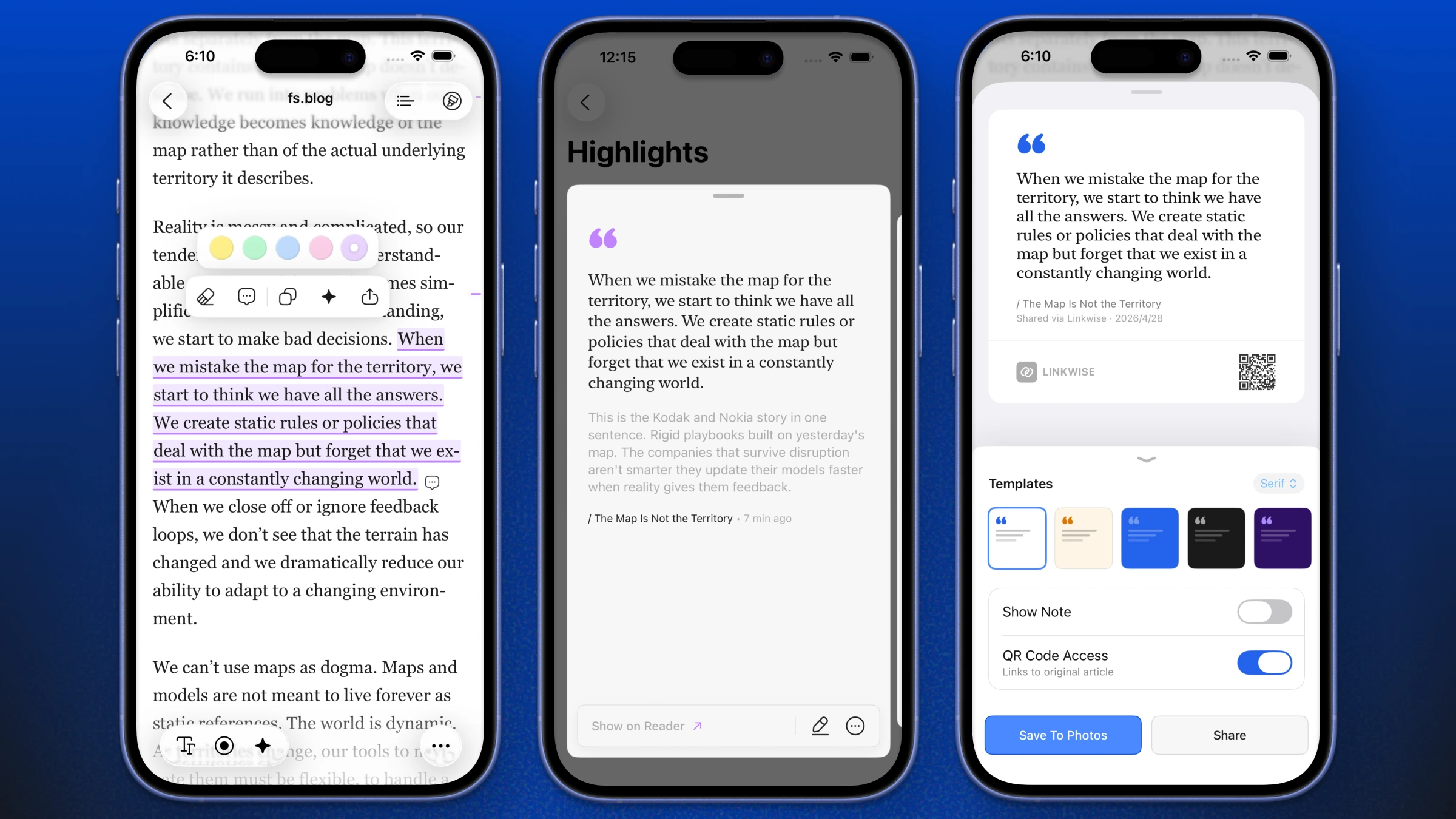
What's New
Highlights & Annotations: Select text and attach personal notes directly within the custom reader to capture your thoughts exactly where they happen.
Beautiful Image Sharing: Export your highlights and annotations as images using a variety of beautifully designed custom templates, perfect for sharing on social media.
Fixes & Improvements
Smarter Article Parsing: Resolved edge-case parsing issues for faster, cleaner, and more accurate text extraction across complex web layouts.
Performance & Stability: Fixed unexpected crashes and implemented general UI refinements to ensure a buttery-smooth native experience.
- 1.0.5
Enhanced Control & Expanded Access
UpdateImportexportThis release focuses on giving you more control over your data and making the Linkwise experience smoother and more accessible.
Data Flexibility - Expanded import and export capabilities now support a wider variety of file formats, including
.html,.csv,.json. Learn moreGlobal Reach - Linkwise is now fully localized in 8 different languages: English, Spanish, German, French, Hindi, Japanese, Korean, and Simplified Chinese.
Efficient Organization - Introduced bulk actions to help you manage and organize your entire library in seconds.
Smoother Experience - General bug fixes and UI refinements for a more reliable, native feel.
- 1.0.4
A Fresh Look & Smarter Insights
AnnouncementupdateAI InsightsiOSThis update brings a completely redesigned experience alongside a powerful new AI-driven feature built for how you actually use Linkwise.
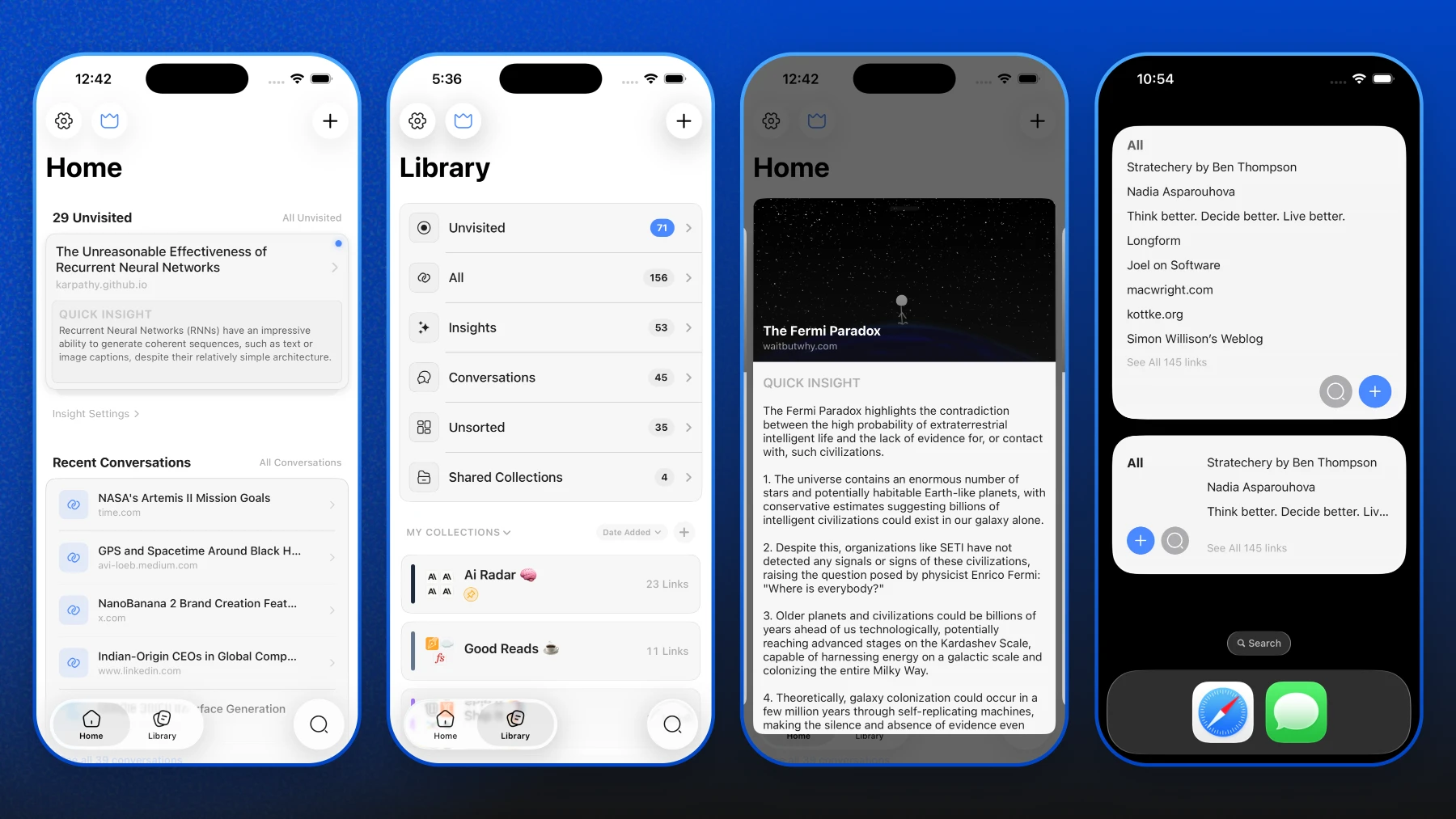
Auto AI Insights - Every saved link now automatically generates AI-powered insights ( if opted for auto insights ), available in 8 languages.
Simplified Navigation -Three clean tabs: Home, Library, and Search. Everything where you'd expect it.
Redesigned Widgets - Fresh home screen widgets to keep your saved content front and center.
Extended PRO Limits - PRO users can now save unlimited links and collections.
Bug Fixes - Resolved minor routing issues and improved AI Chat stability.
Introducing "Article Outline"
BlogfeaturereaderJust shipped Article Outline for the Linkwise Reader! Now you can navigate massive web articles just like a well-structured book. Scan the outline, skip the fluff, and jump straight to the parts you actually care about.
Introducing the Linkwise Reader
DevelopmentiOSreaderproductivityupdateSaving links is great, but actually reading them on cluttered websites can be annoying. So, I built a dedicated reader right into Linkwise.
Here is what’s coming in the next update:
Distraction-free reading: No ads, pop-ups, or messy layouts. Just clean text.
Read offline: Your saved articles are automatically downloaded, so you can read them anywhere without an internet connection.
Auto-save progress: The app remembers exactly where you stopped scrolling, so you never lose your place.
Make it comfortable: You can now tweak the fonts and layout to match how you like to read.
I'm finishing up the final details and will be pushing this to the App Store soon.
Introducing Speech Mode for Linkwise AI
AnnouncementAISpeech ModeText-to-SpeechAccessibilityGive your eyes a rest and listen to your saved content on the go.
Linkwise AI now features Speech Mode, allowing you to have articles, recipes, and notes read aloud. Choose from four distinct, high-quality voices Coral, Ash, Alloy, and Fable, to find the perfect tone for your listening experience. Whether you're commuting, cooking, or just multitasking, your reading list is now completely hands-free.
Finally got Linkwise widgets running smoothly on the Home Screen! 🧩
DevelopmentiOSwidgetupdateIt took some SwiftUI wrangling, but you can now jump straight to your pinned and recent saves without having to open the app. Just wrapping up some final testing before rolling it out.V1 is officially out in the wild! 🚀
AchievementGetting to this launch took a ridiculous amount of coffee and late nights obsessing over SwiftUI components just to get the native feel exactly right (especially that smooth logo reveal). Wiring up Supabase for the backend and routing the AI models through Portkey was definitely a complex puzzle, but seeing the whole stack run flawlessly in production is the best feeling. This is really just day one. I'll be keeping a close eye on initial feedback while I prep the next batch of features. Go grab it and let me know what you think!Linkwise iOS App Submitted for Review! 🚀
AchievementappstoreiosdevmilestonebuildinpubliclinkwiseHuge milestone achieved! 🎉 The Linkwise iOS app has officially been submitted to the App Store for review. After countless hours of coding, refining, and testing, I can't wait to share this with you all. Stay tuned for the official launch! 🍏✨Linkwise coming soon
Announcementlaunchlinkwisecoming soonI am putting the final polish on Linkwise! Development is wrapping up, and I am preparing for the official launch on the App Store. I can't wait to share what I've been building. Stay tuned for the official release date, and sign up for updates so you don't miss launch day!